Soil Moisture on OLED: Capacitive Sensor
Overview & Wiring
What it is: A capacitive soil-moisture sensor measures how wet soil is by sensing its dielectric constant. Because it doesn't pass current through the soil, it doesn't corrode like the old resistive "two-prong" probes — so it lasts far longer in a plant pot.
How it works: The board outputs an analog voltage that rises as the soil gets drier. You read it and map it between your own "fully wet" and "dry in air" calibration points to get a 0–100 % moisture figure.
Wiring:
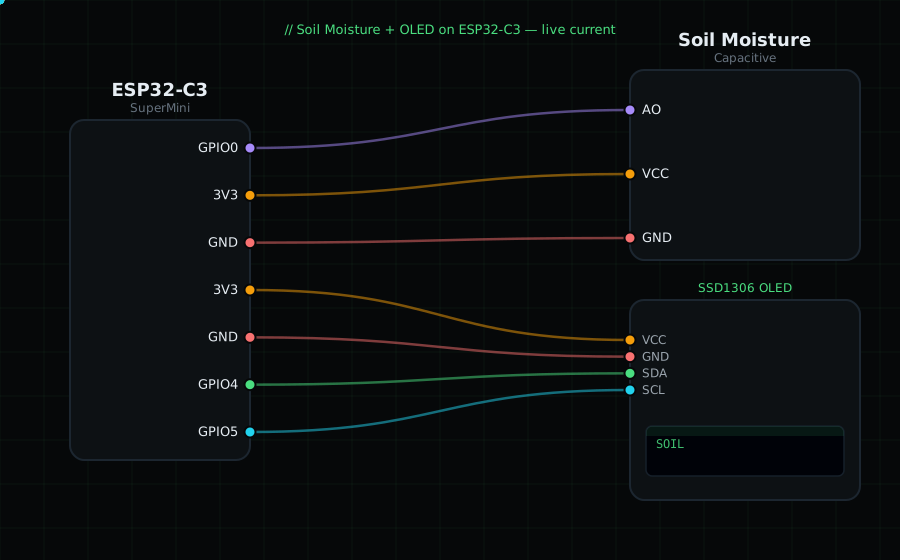
Soil AO -> GPIO0 (analog)
Soil VCC -> 3V3
Soil GND -> GND
OLED VCC=3V3, GND=GND, SDA=GPIO4, SCL=GPIO5
Libraries: only "Adafruit SSD1306" and "Adafruit GFX Library".
On screen / Serial: moisture as 0–100 % plus the raw millivolts. Dip the probe (up to the line, not the electronics) in water vs leave it in air.
Gotchas: You MUST calibrate: note the mV in dry air (AIR_MV) and in a glass of water (WATER_MV) and put them in the code. Only submerge the sensing area, never the top electronics. Different boards read different ranges, so calibration is per-sensor.
Circuit Diagram
Parts You Need
Source Code (Arduino / ESP32)
#include <Wire.h>
#include <Adafruit_GFX.h>
#include <Adafruit_SSD1306.h>

Adafruit_SSD1306 display(128, 64, &Wire, -1);

#define SOIL 0                // AO on GPIO0 (ADC)
const int AIR_MV   = 2600;    // reading in dry air  (calibrate!)
const int WATER_MV = 1200;    // reading in water    (calibrate!)

void setup() {
  Serial.begin(115200);
  Wire.begin(4, 5);
  display.begin(SSD1306_SWITCHCAPVCC, 0x3C);
}

void loop() {
  int mv = analogReadMilliVolts(SOIL);
  int pct = map(mv, AIR_MV, WATER_MV, 0, 100); // dry->0, wet->100
  pct = constrain(pct, 0, 100);

  display.clearDisplay();
  display.setTextColor(SSD1306_WHITE);
  display.setTextSize(1);
  display.setCursor(0, 0);
  display.println("Soil Moisture");
  display.setTextSize(3);
  display.setCursor(0, 18);
  display.printf("%d%%", pct);
  display.setTextSize(1);
  display.setCursor(0, 54); display.printf("%d mV", mv);
  display.display();

  Serial.printf("Soil: %d%%  (%d mV)\n", pct, mv);
  delay(500);
}