Rain Sensor FC-37 on OLED: Rain Detection
Overview & Wiring
What it is: The FC-37 rain sensor is a comb-shaped board that detects water drops landing across its tracks. Paired with its comparator module it tells you how wet the surface is — used in weather stations and "close the window" alarms.
How it works: Water bridging the tracks lowers their resistance. The comparator module's analog output (AO) falls as the board gets wetter. This sketch maps AO to a 0–100 % wetness and flags "RAIN" past a threshold.
Wiring:
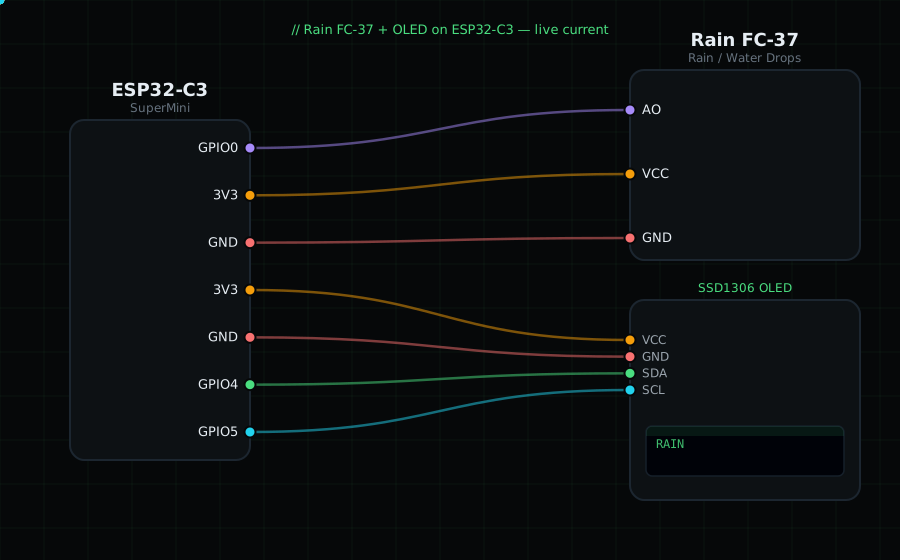
Rain module AO -> GPIO0 (analog)
Rain module VCC -> 3V3
Rain module GND -> GND
(the sensing plate connects to the comparator module with its 2-pin lead)
OLED VCC=3V3, GND=GND, SDA=GPIO4, SCL=GPIO5
Libraries: only "Adafruit SSD1306" and "Adafruit GFX Library".
On screen / Serial: wetness 0–100 % and "DRY" / "RAIN". Flick a few drops of water on the plate.
Gotchas: The exposed copper corrodes over time if left powered and wet — power it only when sampling for outdoor use. Higher raw = drier on these modules, so the code inverts it. Tune the trimmer/threshold for your definition of "raining".
Circuit Diagram
Parts You Need
Source Code (Arduino / ESP32)
#include <Wire.h>
#include <Adafruit_GFX.h>
#include <Adafruit_SSD1306.h>

Adafruit_SSD1306 display(128, 64, &Wire, -1);

#define RAIN 0                // AO on GPIO0 (ADC)

void setup() {
  Serial.begin(115200);
  Wire.begin(4, 5);
  display.begin(SSD1306_SWITCHCAPVCC, 0x3C);
}

void loop() {
  int raw = analogRead(RAIN);                  // higher = drier
  int wet = map(raw, 4095, 0, 0, 100);         // invert -> wetness %
  wet = constrain(wet, 0, 100);

  display.clearDisplay();
  display.setTextColor(SSD1306_WHITE);
  display.setTextSize(1);
  display.setCursor(0, 0);
  display.println("Rain FC-37");
  display.setTextSize(3);
  display.setCursor(0, 18);
  display.printf("%d%%", wet);
  display.setTextSize(1);
  display.setCursor(0, 54); display.print(wet > 40 ? "RAIN" : "DRY");
  display.display();

  Serial.printf("Wet: %d%%  (%s, raw %d)\n", wet, wet > 40 ? "RAIN" : "dry", raw);
  delay(400);
}