OLED Graphics: Shapes, Boxes & Big Text
Overview & Wiring
Go beyond text - draw rectangles, circles and triangles on the SSD1306, and mix font sizes.
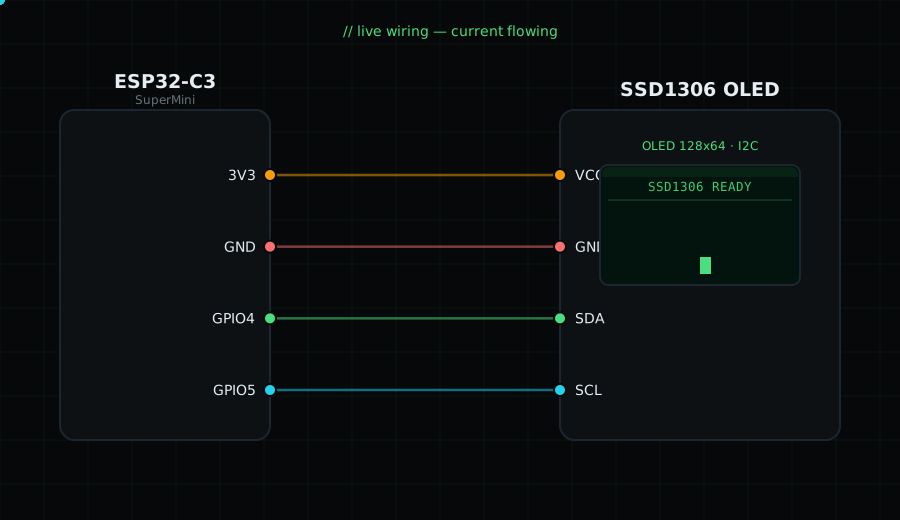
Wiring is identical to the OLED Hello World tutorial:
VCC -> 3V3, GND -> GND, SDA -> GPIO4, SCL -> GPIO5.
Libraries: Adafruit SSD1306, Adafruit GFX.
Circuit Diagram
Parts You Need
Source Code (Arduino / ESP32)
#include <Wire.h>              // I2C library
#include <Adafruit_GFX.h>     // shape + text drawing functions
#include <Adafruit_SSD1306.h> // OLED driver

Adafruit_SSD1306 display(128, 64, &Wire, -1); // 128x64 OLED over I2C

void setup() {
  Wire.begin(4, 5);                       // I2C: SDA=GPIO4, SCL=GPIO5
  display.begin(SSD1306_SWITCHCAPVCC, 0x3C); // start OLED at address 0x3C
  display.clearDisplay();                 // clear the buffer

  display.setTextSize(2);                 // 2 = double-size font
  display.setTextColor(SSD1306_WHITE);
  display.setCursor(0, 0);                // top-left
  display.println("Gokul");               // draw the title text

  // drawRect(x, y, width, height, color) - outline only
  display.drawRect(0, 24, 60, 20, SSD1306_WHITE);
  // fillRoundRect(x, y, w, h, cornerRadius, color) - filled, rounded corners
  display.fillRoundRect(70, 24, 58, 20, 4, SSD1306_WHITE);
  // drawCircle(centerX, centerY, radius, color) - outline circle
  display.drawCircle(20, 54, 8, SSD1306_WHITE);
  // fillTriangle(x0,y0, x1,y1, x2,y2, color) - solid triangle
  display.fillTriangle(50, 62, 70, 46, 90, 62, SSD1306_WHITE);

  display.display();                      // send everything to the screen
}

void loop() {}                            // static image, nothing repeats