OLED Animation: Bouncing Ball
Overview & Wiring
Your first animation - a ball that bounces around the screen. Teaches the clear -> draw -> display loop that every OLED animation uses.
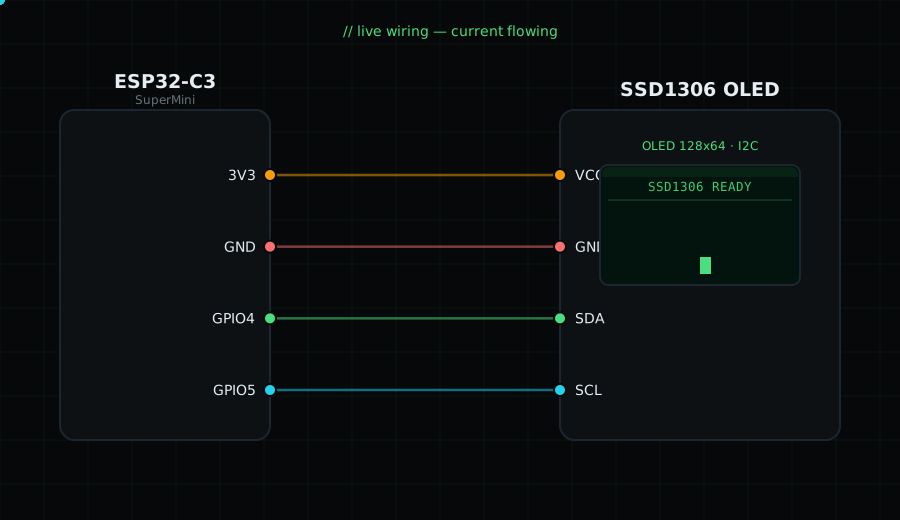
Wiring: VCC -> 3V3, GND -> GND, SDA -> GPIO4, SCL -> GPIO5.
Libraries: Adafruit SSD1306, Adafruit GFX.
Circuit Diagram
Parts You Need
Source Code (Arduino / ESP32)
#include <Wire.h>
#include <Adafruit_GFX.h>
#include <Adafruit_SSD1306.h>

Adafruit_SSD1306 display(128, 64, &Wire, -1);

// Ball state: position (x,y), velocity (dx,dy), radius r
int x = 20, y = 20, dx = 2, dy = 2, r = 6;

void setup() {
  Wire.begin(4, 5);                        // I2C on GPIO4/GPIO5
  display.begin(SSD1306_SWITCHCAPVCC, 0x3C); // start OLED
}

void loop() {
  display.clearDisplay();                  // erase previous frame
  display.fillCircle(x, y, r, SSD1306_WHITE); // draw the ball at current spot
  display.display();                       // show this frame

  x += dx; y += dy;                        // move the ball by its velocity

  // If the ball hits a left/right edge, flip horizontal direction
  if (x <= r || x >= 127 - r) dx = -dx;
  // If it hits a top/bottom edge, flip vertical direction
  if (y <= r || y >= 63 - r) dy = -dy;

  delay(15);                               // ~66 fps; smaller = faster
}