MPU9250 on OLED: 9-Axis IMU
Overview & Wiring
What it is: The MPU9250 is a 9-axis IMU — accelerometer, gyroscope AND magnetometer. The added magnetometer lets it work out a real compass heading and full orientation, which the MPU6050 can't.
How it works: I2C device at address 0x68. The library reads all nine axes and can compute yaw/pitch/roll. Shares SDA/SCL with the OLED. This sketch shows acceleration and the yaw (heading) angle.
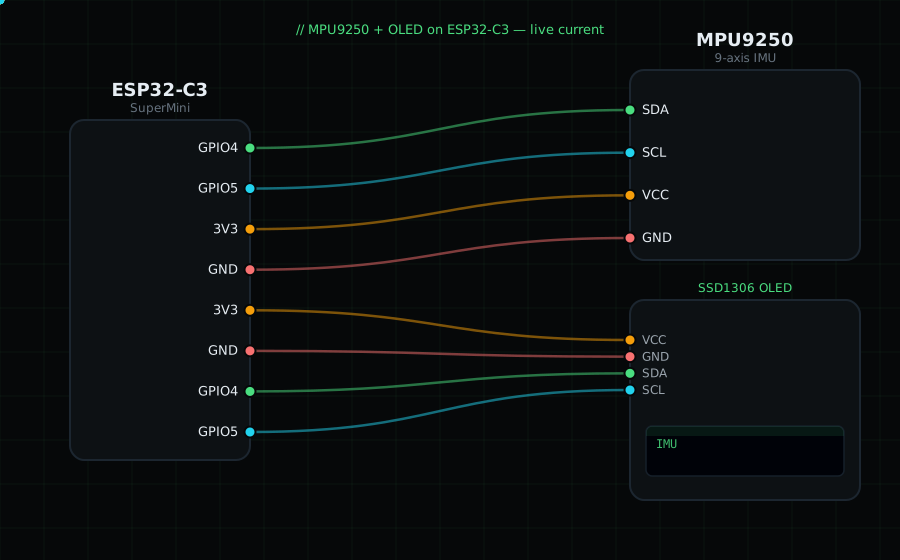
Wiring (shared I2C bus with the OLED):
MPU9250 SDA -> GPIO4
MPU9250 SCL -> GPIO5
MPU9250 VCC -> 3V3
MPU9250 GND -> GND
OLED VCC=3V3, GND=GND, SDA=GPIO4, SCL=GPIO5
Libraries: "MPU9250" by hideakitai, plus "Adafruit SSD1306" and "Adafruit GFX Library".
On screen / Serial: acceleration X and the yaw angle in degrees. Rotate the board flat to watch yaw sweep 0–360°.
Gotchas: Many cheap "MPU9250" boards are actually MPU6500 (no magnetometer) or the newer ICM-20948 — yaw won't work on those. For accurate heading, calibrate the magnetometer by rotating the board in a figure-8 at startup. Address 0x68.
Circuit Diagram
Parts You Need
Source Code (Arduino / ESP32)
#include <Wire.h>
#include <Adafruit_GFX.h>
#include <Adafruit_SSD1306.h>
#include <MPU9250.h>

Adafruit_SSD1306 display(128, 64, &Wire, -1);
MPU9250 mpu;

void setup() {
  Serial.begin(115200);
  Wire.begin(4, 5);
  display.begin(SSD1306_SWITCHCAPVCC, 0x3C);
  if (!mpu.setup(0x68)) {
    Serial.println("MPU9250 not found");
    display.setTextColor(SSD1306_WHITE);
    display.setCursor(0, 28); display.println("MPU9250 not found");
    display.display();
    while (1) delay(10);
  }
}

void loop() {
  if (mpu.update()) {
    float ax = mpu.getAccX();
    float yaw = mpu.getYaw();

    display.clearDisplay();
    display.setTextColor(SSD1306_WHITE);
    display.setTextSize(1);
    display.setCursor(0, 0);  display.println("MPU9250 IMU");
    display.setTextSize(2);
    display.setCursor(0, 16); display.printf("aX %.2f", ax);
    display.setCursor(0, 40); display.printf("yaw %.0f", yaw);
    display.display();

    Serial.printf("aX %.2f  yaw %.1f deg\n", ax, yaw);
  }
  delay(100);
}