ADXL345 on OLED: 3-Axis Accelerometer
Overview & Wiring
What it is: The ADXL345 is a small, low-power 3-axis accelerometer with excellent resolution. It's ideal for tilt sensing, tap/double-tap detection, freefall detection, and vibration monitoring.
How it works: I2C device at address 0x53. It measures acceleration on X/Y/Z in g (or m/s²); at rest, gravity registers as ~9.8 m/s² on the vertical axis. Shares SDA/SCL with the OLED.
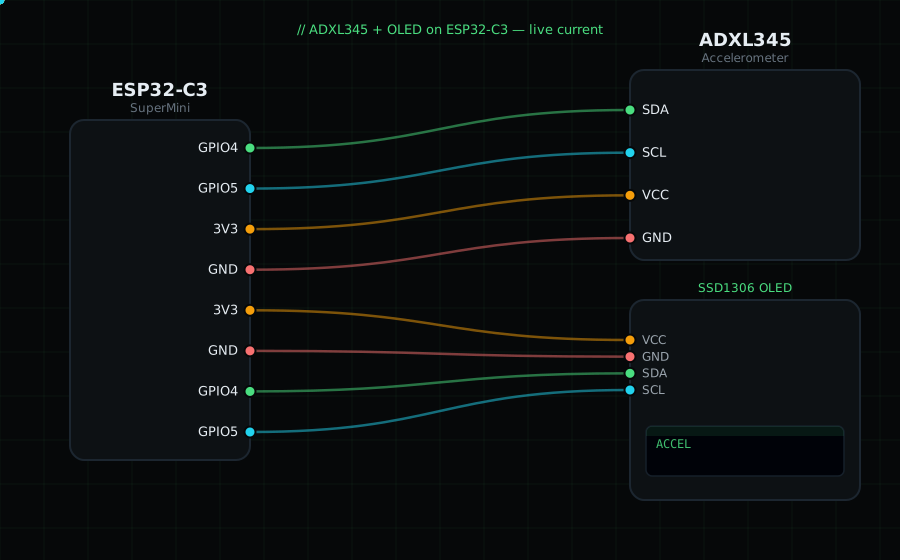
Wiring (shared I2C bus with the OLED):
ADXL345 SDA -> GPIO4
ADXL345 SCL -> GPIO5
ADXL345 VCC -> 3V3
ADXL345 GND -> GND
OLED VCC=3V3, GND=GND, SDA=GPIO4, SCL=GPIO5
Libraries: "Adafruit ADXL345" (installs "Adafruit Unified Sensor" and "Adafruit BusIO"), plus "Adafruit SSD1306" and "Adafruit GFX Library".
On screen / Serial: acceleration X/Y/Z in m/s². Tap or tilt the board to see the values respond.
Gotchas: Default address is 0x53 (0x1D if the SDO pin is tied high). It's a 3.3V part — don't feed VCC 5V unless your board has a regulator. Choose the ±2g range (default) for the finest resolution.
Circuit Diagram
Parts You Need
Source Code (Arduino / ESP32)
#include <Wire.h>
#include <Adafruit_GFX.h>
#include <Adafruit_SSD1306.h>
#include <Adafruit_ADXL345_U.h>

Adafruit_SSD1306 display(128, 64, &Wire, -1);
Adafruit_ADXL345_Unified accel = Adafruit_ADXL345_Unified(12345);

void setup() {
  Serial.begin(115200);
  Wire.begin(4, 5);
  display.begin(SSD1306_SWITCHCAPVCC, 0x3C);
  if (!accel.begin()) {
    Serial.println("ADXL345 not found");
    display.setTextColor(SSD1306_WHITE);
    display.setCursor(0, 28); display.println("ADXL345 not found");
    display.display();
    while (1) delay(10);
  }
  accel.setRange(ADXL345_RANGE_2_G);
}

void loop() {
  sensors_event_t e;
  accel.getEvent(&e);

  display.clearDisplay();
  display.setTextColor(SSD1306_WHITE);
  display.setTextSize(1);
  display.setCursor(0, 0);  display.println("ADXL345 m/s2");
  display.setTextSize(2);
  display.setCursor(0, 14); display.printf("X %.1f", e.acceleration.x);
  display.setCursor(0, 32); display.printf("Y %.1f", e.acceleration.y);
  display.setCursor(0, 50); display.setTextSize(1); display.printf("Z %.2f", e.acceleration.z);
  display.display();

  Serial.printf("X %.2f  Y %.2f  Z %.2f m/s2\n",
                e.acceleration.x, e.acceleration.y, e.acceleration.z);
  delay(200);
}