Flame Sensor on OLED: Fire Detection
Overview & Wiring
What it is: A flame sensor is an infrared photodiode tuned to the ~760–1100 nm light a flame gives off. It detects an open flame up to about a metre away and is the core of fire-alarm and firefighting-robot projects.
How it works: The module's analog output (AO) changes with how much flame-IR hits it — typically the voltage drops when a flame is detected. This sketch reads AO and flags "FIRE" when the reading crosses a threshold you can tune.
Wiring:
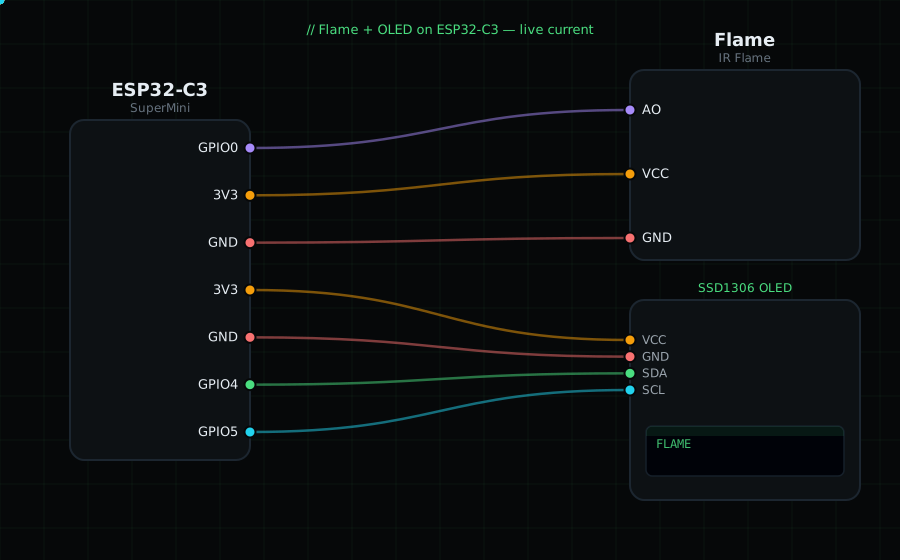
Flame AO -> GPIO0 (analog)
Flame VCC -> 3V3
Flame GND -> GND
OLED VCC=3V3, GND=GND, SDA=GPIO4, SCL=GPIO5
Libraries: only "Adafruit SSD1306" and "Adafruit GFX Library".
On screen / Serial: "SAFE" or "FIRE!" plus the raw ADC value so you can pick a good THRESHOLD. Test with a lighter or candle at a safe distance.
Gotchas: These sensors also react to strong sunlight and incandescent bulbs — shield the project from those. Adjust THRESHOLD in the code to your module and lighting. The onboard blue trimmer sets the digital-out point, not the analog reading.
Circuit Diagram
Parts You Need
Source Code (Arduino / ESP32)
#include <Wire.h>
#include <Adafruit_GFX.h>
#include <Adafruit_SSD1306.h>

Adafruit_SSD1306 display(128, 64, &Wire, -1);

#define FLAME 0               // AO on GPIO0 (ADC)
const int THRESHOLD = 1500;   // below this = flame (tune to your module)

void setup() {
  Serial.begin(115200);
  Wire.begin(4, 5);
  display.begin(SSD1306_SWITCHCAPVCC, 0x3C);
}

void loop() {
  int raw = analogRead(FLAME);
  bool fire = raw < THRESHOLD;                 // lower reading = more IR = flame

  display.clearDisplay();
  display.setTextColor(SSD1306_WHITE);
  display.setTextSize(1);
  display.setCursor(0, 0);
  display.println("Flame Sensor");
  display.setTextSize(3);
  display.setCursor(0, 22);
  display.println(fire ? "FIRE!" : "SAFE");
  display.setTextSize(1);
  display.setCursor(0, 54); display.printf("raw %d", raw);
  display.display();

  Serial.printf("%s  (raw %d)\n", fire ? "FIRE" : "safe", raw);
  delay(200);
}