IR Obstacle Sensor on OLED: Obstacle Detection
Overview & Wiring
What it is: An IR obstacle-avoidance sensor has an infrared LED and a receiver side by side. When something reflects the IR back, it flags an obstacle. It's the cheap "bumper" sensor on line-follower and obstacle-avoiding robots.
How it works: It's a digital sensor — its OUT pin goes LOW when an obstacle is detected within range (a few cm to ~30 cm, set by the onboard trimmer). No analog reading needed.
Wiring:
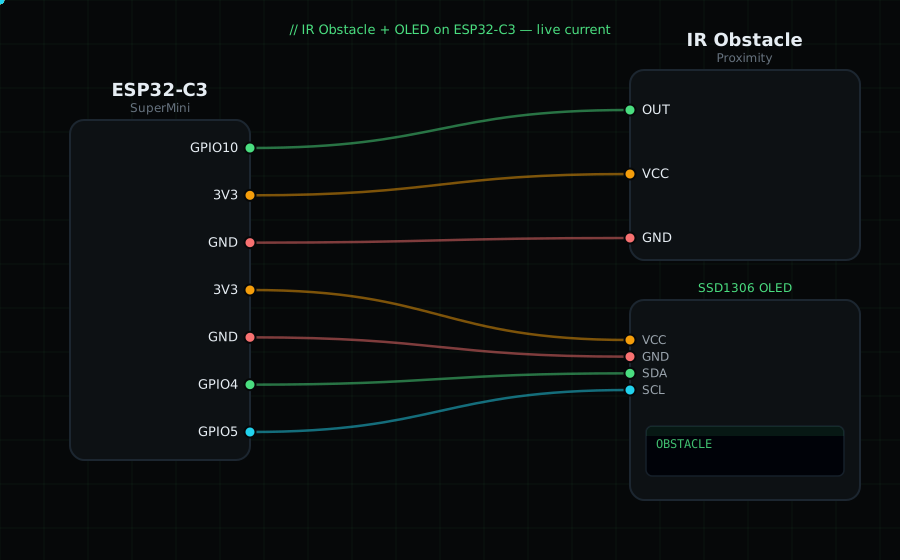
IR OUT -> GPIO10 (digital)
IR VCC -> 3V3
IR GND -> GND
OLED VCC=3V3, GND=GND, SDA=GPIO4, SCL=GPIO5
Libraries: only "Adafruit SSD1306" and "Adafruit GFX Library".
On screen / Serial: "CLEAR" or "OBSTACLE". Wave your hand in front of it and adjust the trimmer to set the trigger distance.
Gotchas: OUT is active-LOW on almost all of these modules (LOW = obstacle), which is why the code inverts it. Range and reliability drop on dark or matte surfaces that absorb IR. Bright sunlight can cause false triggers.
Circuit Diagram
Parts You Need
Source Code (Arduino / ESP32)
#include <Wire.h>
#include <Adafruit_GFX.h>
#include <Adafruit_SSD1306.h>

Adafruit_SSD1306 display(128, 64, &Wire, -1);

#define IR 10                 // OUT on GPIO10 (digital, active-LOW)

void setup() {
  Serial.begin(115200);
  Wire.begin(4, 5);
  display.begin(SSD1306_SWITCHCAPVCC, 0x3C);
  pinMode(IR, INPUT);
}

void loop() {
  bool obstacle = digitalRead(IR) == LOW;      // LOW = obstacle detected

  display.clearDisplay();
  display.setTextColor(SSD1306_WHITE);
  display.setTextSize(1);
  display.setCursor(0, 0);
  display.println("IR Obstacle");
  display.setTextSize(2);
  display.setCursor(0, 26);
  display.println(obstacle ? "OBSTACLE" : "CLEAR");
  display.display();

  Serial.println(obstacle ? "OBSTACLE" : "clear");
  delay(120);
}