ESP32-C3 SuperMini + OLED (SSD1306): Wiring & Hello World
Overview & Wiring
Wire a 0.96" SSD1306 I2C OLED to an ESP32-C3 SuperMini and print text.
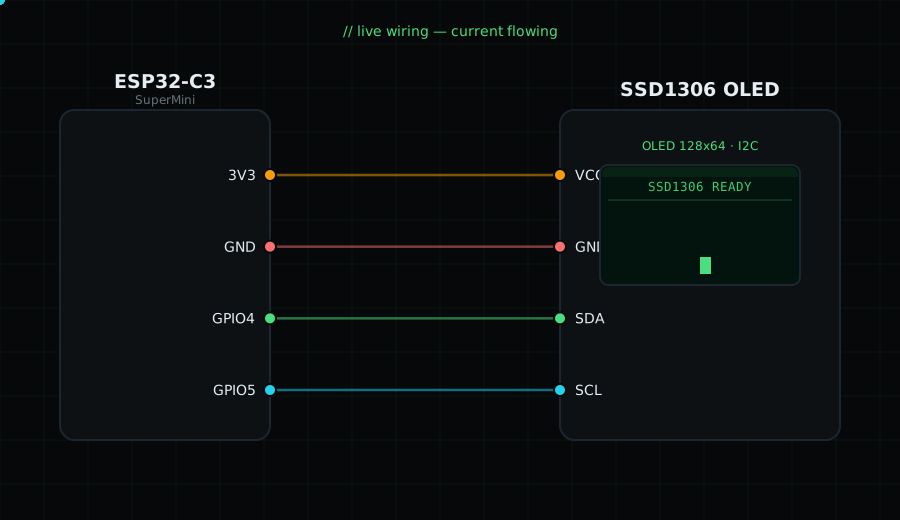
Wiring (4 wires):
VCC -> 3V3
GND -> GND
SDA -> GPIO4
SCL -> GPIO5
Do NOT use GPIO8/GPIO9 for I2C on the SuperMini - they drive the onboard LED and BOOT button. GPIO4/GPIO5 avoid that.
Libraries (Arduino IDE -> Library Manager): "Adafruit SSD1306" and "Adafruit GFX Library". Board: "ESP32C3 Dev Module".
Circuit Diagram
Parts You Need
Source Code (Arduino / ESP32)
#include <Wire.h>              // I2C communication library
#include <Adafruit_GFX.h>     // core graphics functions (text, shapes)
#include <Adafruit_SSD1306.h> // driver for the SSD1306 OLED

// Create the display object: 128 wide, 64 tall, using I2C (&Wire), no reset pin (-1)
Adafruit_SSD1306 display(128, 64, &Wire, -1);

void setup() {
  Serial.begin(115200);       // start Serial so we can print error messages
  Wire.begin(4, 5);           // start I2C on SDA=GPIO4, SCL=GPIO5 (SuperMini safe pins)

  // Try to start the OLED at I2C address 0x3C; if it fails, stop here
  if (!display.begin(SSD1306_SWITCHCAPVCC, 0x3C)) {
    Serial.println("SSD1306 not found");
    for (;;);                 // infinite loop = halt the program
  }

  display.clearDisplay();               // wipe the screen buffer
  display.setTextSize(1);               // 1 = smallest font (6x8 px)
  display.setTextColor(SSD1306_WHITE);  // white pixels on black
  display.setCursor(0, 0);              // move "cursor" to top-left (x=0, y=0)
  display.println("Hello, Gokul.builds!"); // queue a line of text
  display.println("ESP32-C3 + OLED ready.");
  display.display();                    // push the buffer to the actual screen
}

void loop() {}                          // nothing to repeat; the screen stays as-is