APDS9960 on OLED: Proximity & Gesture
Overview & Wiring
What it is: The APDS9960 is the sensor from old smartphones that can detect proximity, ambient light, RGB colour, and hand gestures (swipe up/down/left/right). This tutorial uses its proximity mode, the easiest to get running.
How it works: I2C device at address 0x39. In proximity mode it returns a 0–255 value that rises as an object gets closer (roughly within 10 cm). Shares SDA/SCL with the OLED.
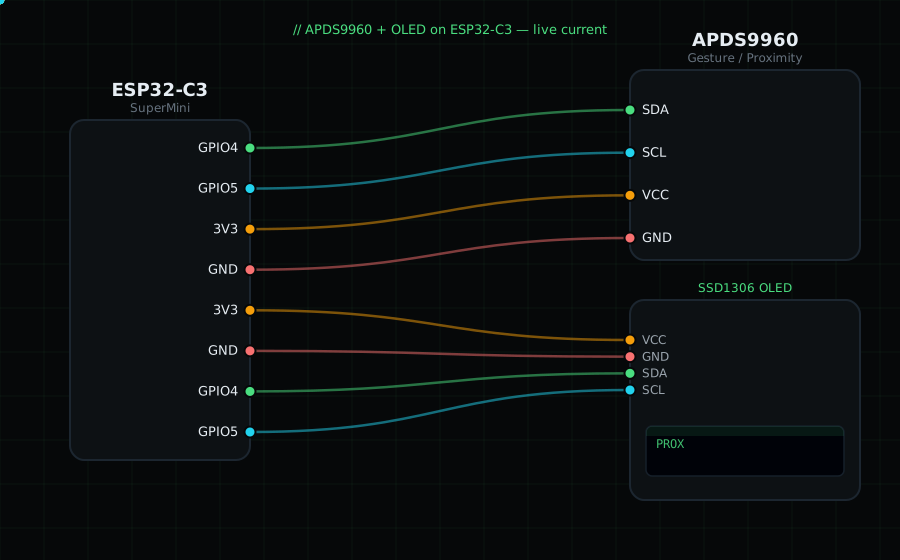
Wiring (shared I2C bus with the OLED):
APDS9960 SDA -> GPIO4
APDS9960 SCL -> GPIO5
APDS9960 VCC -> 3V3
APDS9960 GND -> GND
OLED VCC=3V3, GND=GND, SDA=GPIO4, SCL=GPIO5
Libraries: "SparkFun APDS9960 RGB and Gesture Sensor", plus "Adafruit SSD1306" and "Adafruit GFX Library".
On screen / Serial: a proximity value 0–255 and a bar. Move your hand toward and away from it.
Gotchas: Gesture mode needs the interrupt pin and more setup; proximity is the friendly starting point. Address 0x39 is fixed. It shares 0x39 with the TSL2561 default — don't put both on one bus.
Circuit Diagram
Parts You Need
Source Code (Arduino / ESP32)
#include <Wire.h>
#include <Adafruit_GFX.h>
#include <Adafruit_SSD1306.h>
#include <SparkFun_APDS9960.h>

Adafruit_SSD1306 display(128, 64, &Wire, -1);
SparkFun_APDS9960 apds = SparkFun_APDS9960();

void setup() {
  Serial.begin(115200);
  Wire.begin(4, 5);
  display.begin(SSD1306_SWITCHCAPVCC, 0x3C);
  if (!apds.init()) {
    Serial.println("APDS9960 not found");
    display.setTextColor(SSD1306_WHITE);
    display.setCursor(0, 28); display.println("APDS9960 not found");
    display.display();
    while (1) delay(10);
  }
  apds.enableProximitySensor(false);          // proximity, no interrupt
}

void loop() {
  uint8_t prox = 0;
  apds.readProximity(prox);                    // 0..255, higher = closer

  display.clearDisplay();
  display.setTextColor(SSD1306_WHITE);
  display.setTextSize(1);
  display.setCursor(0, 0);
  display.println("APDS9960 Prox");
  display.setTextSize(3);
  display.setCursor(0, 18);
  display.printf("%d", prox);
  display.drawRect(0, 54, 128, 8, SSD1306_WHITE);
  display.fillRect(0, 54, map(prox, 0, 255, 0, 128), 8, SSD1306_WHITE);
  display.display();

  Serial.printf("Proximity: %d\n", prox);
  delay(150);
}