Water Level Sensor on OLED: Depth
Overview & Wiring
What it is: This is the common "stair-step" water-level sensor — a set of interleaved traces whose exposed length determines the reading. The deeper it's submerged, the more traces conduct, and the higher the output. Used for tank level, leak detection and rain gauges.
How it works: The submerged traces form a variable resistor to the signal pin; more water = higher analog voltage. You map it between "dry" and "fully submerged" to a 0–100 % level.
Wiring:
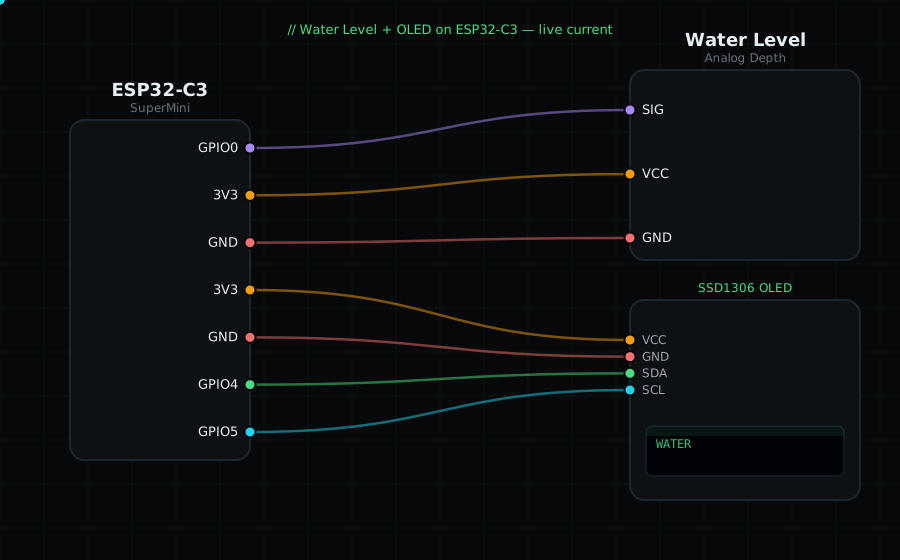
Water SIG (S) -> GPIO0 (analog)
Water VCC (+) -> 3V3
Water GND (-) -> GND
OLED VCC=3V3, GND=GND, SDA=GPIO4, SCL=GPIO5
Libraries: only "Adafruit SSD1306" and "Adafruit GFX Library".
On screen / Serial: level as 0–100 % plus raw millivolts. Dip it gradually into a glass of water.
Gotchas: Like the rain sensor, the traces corrode if kept powered while wet — drive VCC from a GPIO and power it only during a reading for long-term use. Calibrate FULL_MV to the reading at your "full" depth; readings depend on water conductivity.
Circuit Diagram
Parts You Need
Source Code (Arduino / ESP32)
#include <Wire.h>
#include <Adafruit_GFX.h>
#include <Adafruit_SSD1306.h>

Adafruit_SSD1306 display(128, 64, &Wire, -1);

#define WATER 0               // SIG on GPIO0 (ADC)
const int DRY_MV  = 100;      // reading when dry     (calibrate)
const int FULL_MV = 2200;     // reading when full    (calibrate)

void setup() {
  Serial.begin(115200);
  Wire.begin(4, 5);
  display.begin(SSD1306_SWITCHCAPVCC, 0x3C);
}

void loop() {
  int mv = analogReadMilliVolts(WATER);
  int pct = map(mv, DRY_MV, FULL_MV, 0, 100);
  pct = constrain(pct, 0, 100);

  display.clearDisplay();
  display.setTextColor(SSD1306_WHITE);
  display.setTextSize(1);
  display.setCursor(0, 0);
  display.println("Water Level");
  display.setTextSize(3);
  display.setCursor(0, 16);
  display.printf("%d%%", pct);
  display.drawRect(0, 54, 128, 8, SSD1306_WHITE);
  display.fillRect(0, 54, map(pct, 0, 100, 0, 128), 8, SSD1306_WHITE);
  display.display();

  Serial.printf("Level: %d%%  (%d mV)\n", pct, mv);
  delay(400);
}