TTP223 on OLED: Capacitive Touch Button
Overview & Wiring
What it is: The TTP223 is a capacitive touch button — a solid-state replacement for a mechanical push button. Touch the pad and OUT goes HIGH. It even works through a thin sheet of plastic or glass, so you can hide it behind a panel.
How it works: The chip senses the tiny capacitance your finger adds to the pad and drives OUT HIGH while touched. Digital only. This sketch also counts how many times you tap it.
Wiring:
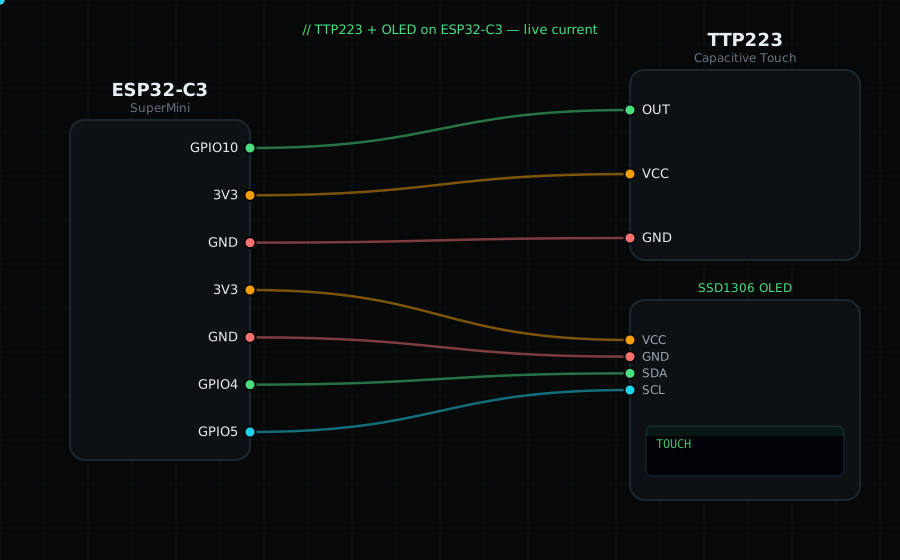
TTP223 OUT (I/O) -> GPIO10 (digital)
TTP223 VCC -> 3V3
TTP223 GND -> GND
OLED VCC=3V3, GND=GND, SDA=GPIO4, SCL=GPIO5
Libraries: only "Adafruit SSD1306" and "Adafruit GFX Library".
On screen / Serial: "TOUCH" while your finger is on the pad, plus a tap counter. Tap it a few times.
Gotchas: Default is active-HIGH momentary. Solder jumpers on the back switch it to toggle mode or active-LOW — leave them alone for this sketch. It recalibrates at power-on, so don't touch it during the first second. Note: the ESP32-C3 also has built-in touch pins, but this uses the external module.
Circuit Diagram
Parts You Need
Source Code (Arduino / ESP32)
#include <Wire.h>
#include <Adafruit_GFX.h>
#include <Adafruit_SSD1306.h>

Adafruit_SSD1306 display(128, 64, &Wire, -1);

#define TOUCH 10              // OUT on GPIO10 (digital, active-HIGH)
long taps = 0;
bool last = false;

void setup() {
  Serial.begin(115200);
  Wire.begin(4, 5);
  display.begin(SSD1306_SWITCHCAPVCC, 0x3C);
  pinMode(TOUCH, INPUT);
}

void loop() {
  bool touched = digitalRead(TOUCH) == HIGH;
  if (touched && !last) { taps++; Serial.printf("Tap #%ld\n", taps); }
  last = touched;

  display.clearDisplay();
  display.setTextColor(SSD1306_WHITE);
  display.setTextSize(1);
  display.setCursor(0, 0);
  display.println("TTP223 Touch");
  display.setTextSize(2);
  display.setCursor(0, 20); display.println(touched ? "TOUCH" : "--");
  display.setTextSize(1);
  display.setCursor(0, 52); display.printf("taps: %ld", taps);
  display.display();
  delay(40);
}