SW-520D on OLED: Tilt Detection
Overview & Wiring
What it is: The SW-520D is a ball tilt switch — a tiny tube with a rolling ball that closes two contacts when upright and opens them when tilted. It's the cheapest way to detect orientation, used in toys, alarms and "shake to wake" gadgets.
How it works: It's just a switch, so you wire it like a button: one side to the GPIO with the internal pull-up on, the other to GND. Upright, the ball bridges the contacts and the pin reads LOW; tilt past ~15° and it opens, reading HIGH.
Wiring:
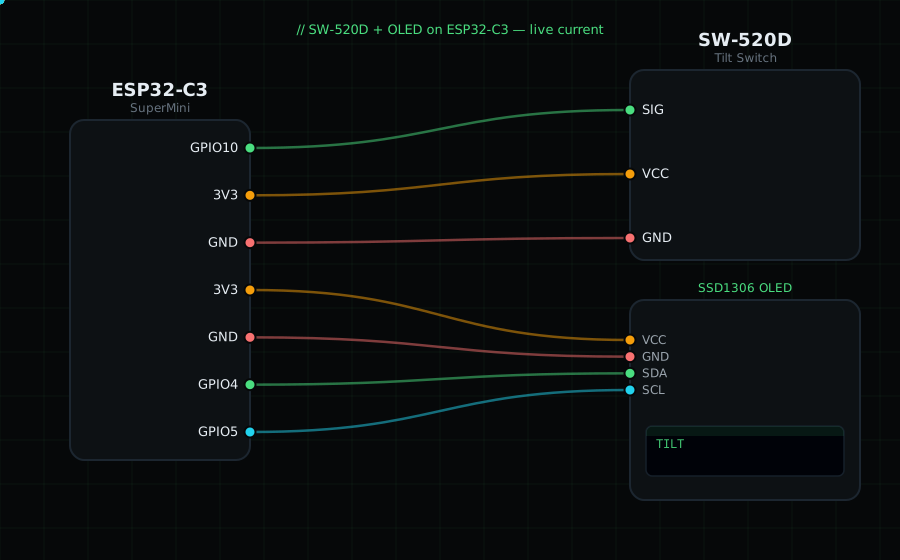
SW-520D pin 1 -> GPIO10
SW-520D pin 2 -> GND
(if your module has VCC/GND/SIG headers: VCC -> 3V3, GND -> GND, SIG -> GPIO10)
OLED VCC=3V3, GND=GND, SDA=GPIO4, SCL=GPIO5
Libraries: only "Adafruit SSD1306" and "Adafruit GFX Library".
On screen / Serial: "FLAT" when upright, "TILT!" when tipped. Rock the board to toggle it.
Gotchas: The ball bounces, so the reading can flicker at the tilt threshold — add a short debounce if you act on it. Which state is "flat" depends on how you mount it; adjust the comparison to match your orientation.
Circuit Diagram
Parts You Need
Source Code (Arduino / ESP32)
#include <Wire.h>
#include <Adafruit_GFX.h>
#include <Adafruit_SSD1306.h>

Adafruit_SSD1306 display(128, 64, &Wire, -1);

#define TILT 10               // one leg on GPIO10, other leg to GND

void setup() {
  Serial.begin(115200);
  Wire.begin(4, 5);
  display.begin(SSD1306_SWITCHCAPVCC, 0x3C);
  pinMode(TILT, INPUT_PULLUP);                 // upright closes to GND -> LOW
}

void loop() {
  bool tilted = digitalRead(TILT) == HIGH;     // open (HIGH) = tilted

  display.clearDisplay();
  display.setTextColor(SSD1306_WHITE);
  display.setTextSize(1);
  display.setCursor(0, 0);
  display.println("SW-520D Tilt");
  display.setTextSize(2);
  display.setCursor(0, 26);
  display.println(tilted ? "TILT!" : "FLAT");
  display.display();

  Serial.println(tilted ? "TILT" : "flat");
  delay(100);
}