SW-420 on OLED: Vibration & Shock
Overview & Wiring
What it is: The SW-420 is a vibration sensor module — a spring-loaded switch that opens and closes when shaken or knocked. It's used for tamper alarms, knock detection, and machine-running indicators.
How it works: At rest the switch is closed and DO reads one level; a vibration jiggles it, toggling DO. The onboard comparator + trimmer set the trigger. This sketch reports "SHAKE" when the digital output goes LOW (the triggered state on most SW-420 boards).
Wiring:
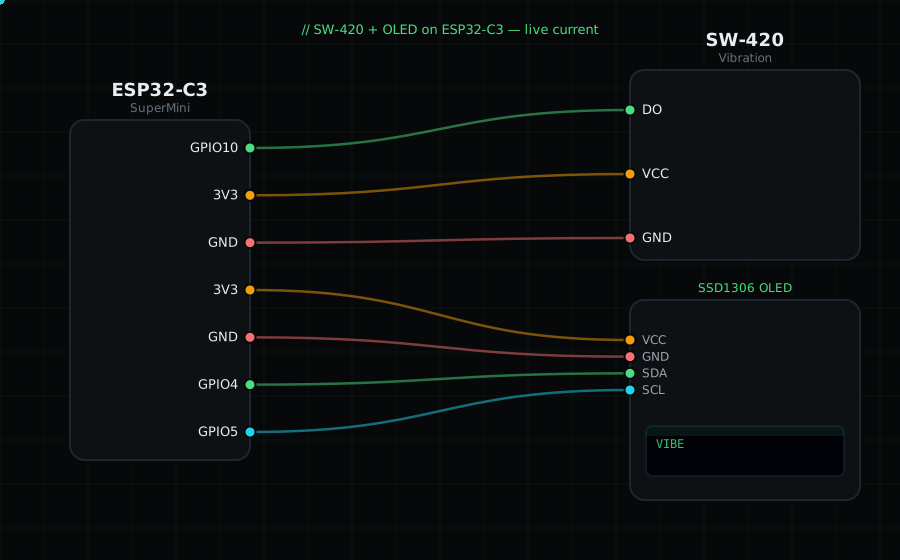
SW-420 DO -> GPIO10 (digital)
SW-420 VCC -> 3V3
SW-420 GND -> GND
OLED VCC=3V3, GND=GND, SDA=GPIO4, SCL=GPIO5
Libraries: only "Adafruit SSD1306" and "Adafruit GFX Library".
On screen / Serial: "STILL" or "SHAKE!". Tap the desk near it and turn the trimmer to set sensitivity.
Gotchas: It's a coarse yes/no vibration switch, not an accelerometer — for measuring vibration magnitude use the ADXL345. The idle/triggered logic can be inverted on some boards; if it reads backwards, flip the comparison in code.
Circuit Diagram
Parts You Need
Source Code (Arduino / ESP32)
#include <Wire.h>
#include <Adafruit_GFX.h>
#include <Adafruit_SSD1306.h>

Adafruit_SSD1306 display(128, 64, &Wire, -1);

#define VIBE 10               // DO on GPIO10 (digital)

void setup() {
  Serial.begin(115200);
  Wire.begin(4, 5);
  display.begin(SSD1306_SWITCHCAPVCC, 0x3C);
  pinMode(VIBE, INPUT);
}

void loop() {
  bool shake = digitalRead(VIBE) == LOW;       // LOW = vibration (typical)

  display.clearDisplay();
  display.setTextColor(SSD1306_WHITE);
  display.setTextSize(1);
  display.setCursor(0, 0);
  display.println("SW-420 Vibration");
  display.setTextSize(2);
  display.setCursor(0, 26);
  display.println(shake ? "SHAKE!" : "STILL");
  display.display();

  Serial.println(shake ? "SHAKE" : "still");
  delay(80);
}