QMC5883L on OLED: Digital Compass
Overview & Wiring
What it is: The QMC5883L is a 3-axis magnetometer that senses the Earth's magnetic field, so you can compute a compass heading (0–360°). It's the chip on most "GY-271" breakouts sold today.
How it works: I2C device at address 0x0D. It reads magnetic field strength on X/Y/Z; the library turns X and Y into an azimuth (heading) in degrees. Shares SDA/SCL with the OLED.
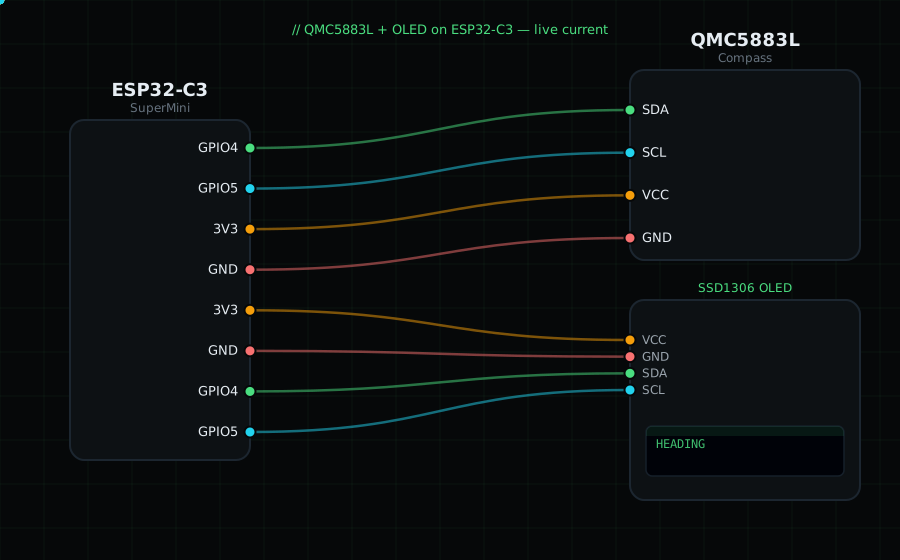
Wiring (shared I2C bus with the OLED):
QMC5883L SDA -> GPIO4
QMC5883L SCL -> GPIO5
QMC5883L VCC -> 3V3
QMC5883L GND -> GND
OLED VCC=3V3, GND=GND, SDA=GPIO4, SCL=GPIO5
Libraries: "QMC5883LCompass" by MPrograms, plus "Adafruit SSD1306" and "Adafruit GFX Library".
On screen / Serial: heading in degrees (0 = North). Rotate the board flat and watch it track like a compass.
Gotchas: Older GY-271 boards use the HMC5883L chip (address 0x1E, different library) — check which you have. Keep it away from motors, speakers and metal, which distort the field. For accuracy, run the library's calibration by rotating the board through all orientations.
Circuit Diagram
Parts You Need
Source Code (Arduino / ESP32)
#include <Wire.h>
#include <Adafruit_GFX.h>
#include <Adafruit_SSD1306.h>
#include <QMC5883LCompass.h>

Adafruit_SSD1306 display(128, 64, &Wire, -1);
QMC5883LCompass compass;

void setup() {
  Serial.begin(115200);
  Wire.begin(4, 5);
  display.begin(SSD1306_SWITCHCAPVCC, 0x3C);
  compass.init();
}

void loop() {
  compass.read();
  int heading = compass.getAzimuth();          // degrees, 0 = North

  display.clearDisplay();
  display.setTextColor(SSD1306_WHITE);
  display.setTextSize(1);
  display.setCursor(0, 0);
  display.println("QMC5883L Compass");
  display.setTextSize(3);
  display.setCursor(0, 22);
  display.printf("%d", heading);
  display.setTextSize(1);
  display.setCursor(0, 54); display.print("degrees");
  display.display();

  Serial.printf("Heading: %d deg\n", heading);
  delay(200);
}