MLX90614 on OLED: Non-contact IR Temperature
Overview & Wiring
What it is: The MLX90614 measures the temperature of a surface without touching it, by reading the infrared it emits. It's the sensor inside no-contact forehead thermometers. It reports both the object temperature and its own ambient temperature.
How it works: I2C device at address 0x5A. It has a fixed field of view (~90° on the bare part, narrower on the "BAA" variant), so it averages everything in its cone. The library returns object and ambient temperature in °C.
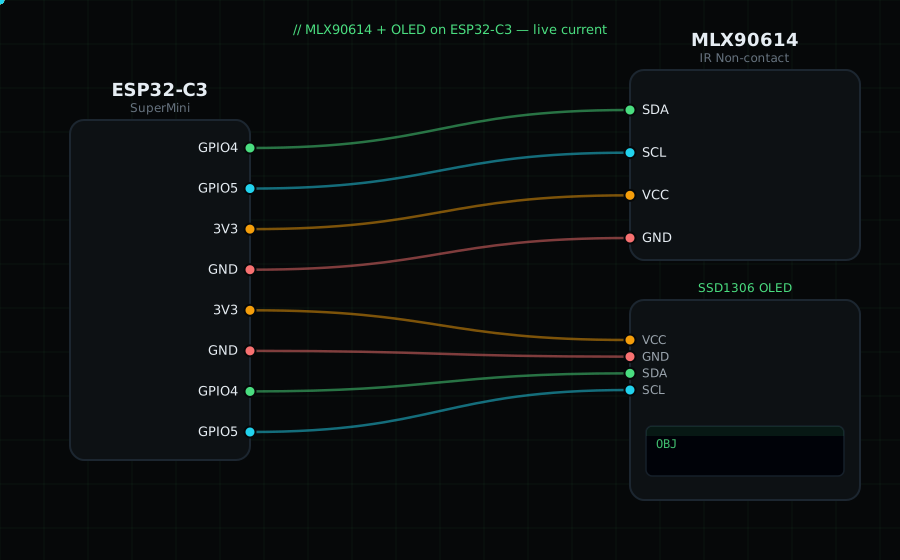
Wiring (shared I2C bus with the OLED):
MLX90614 SDA -> GPIO4
MLX90614 SCL -> GPIO5
MLX90614 VIN -> 3V3
MLX90614 GND -> GND
OLED VCC=3V3, GND=GND, SDA=GPIO4, SCL=GPIO5
Libraries: "Adafruit MLX90614 Library" (installs "Adafruit BusIO"), plus "Adafruit SSD1306" and "Adafruit GFX Library".
On screen / Serial: object temperature (big) and ambient temperature (small). Point it at your hand vs a cold wall to see the difference.
Gotchas: It reads an average over its whole cone, so back off for a spot reading and get close for accuracy. The 3V and 5V board versions exist — the common purple GY-906 breakout works at 3.3V.
Circuit Diagram
Parts You Need
Source Code (Arduino / ESP32)
#include <Wire.h>
#include <Adafruit_GFX.h>
#include <Adafruit_SSD1306.h>
#include <Adafruit_MLX90614.h>

Adafruit_SSD1306 display(128, 64, &Wire, -1);
Adafruit_MLX90614 mlx = Adafruit_MLX90614();

void setup() {
  Serial.begin(115200);
  Wire.begin(4, 5);
  display.begin(SSD1306_SWITCHCAPVCC, 0x3C);
  if (!mlx.begin()) {
    Serial.println("MLX90614 not found");
    display.setTextColor(SSD1306_WHITE);
    display.setCursor(0, 28); display.println("MLX not found");
    display.display();
    while (1) delay(10);
  }
}

void loop() {
  float obj = mlx.readObjectTempC();
  float amb = mlx.readAmbientTempC();

  display.clearDisplay();
  display.setTextColor(SSD1306_WHITE);
  display.setTextSize(1);
  display.setCursor(0, 0);  display.println("MLX90614 object");
  display.setTextSize(3);
  display.setCursor(0, 18); display.printf("%.1f", obj);
  display.setTextSize(1);
  display.setCursor(0, 52); display.printf("ambient %.1f C", amb);
  display.display();

  Serial.printf("Object %.1f C  Ambient %.1f C\n", obj, amb);
  delay(500);
}