MH-Z19B on OLED: Real CO2 (NDIR)
Overview & Wiring
What it is: The MH-Z19B is a true NDIR CO2 sensor (0–5000 ppm) — it measures actual carbon dioxide by how much infrared it absorbs, not a cheap "equivalent" estimate. It's the sensor for real indoor-air / ventilation projects.
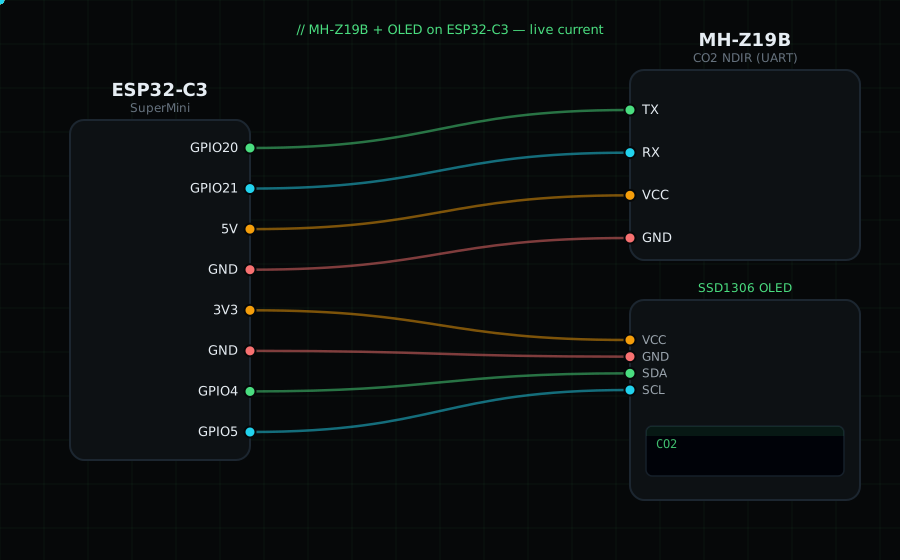
How it works: It talks over a 3.3V UART serial link at 9600 baud. Because it's a serial device, you cross the wires: the sensor's TX goes to the ESP32's RX, and the sensor's RX to the ESP32's TX.
Wiring (UART — note the crossover):
MH-Z19 TX -> GPIO20 (ESP32 RX)
MH-Z19 RX -> GPIO21 (ESP32 TX)
MH-Z19 VIN -> 5V (the IR lamp needs 5V)
MH-Z19 GND -> GND
OLED VCC=3V3, GND=GND, SDA=GPIO4, SCL=GPIO5
Libraries: "MH-Z19" by Jonathan Dempsey, plus "Adafruit SSD1306" and "Adafruit GFX Library".
On screen / Serial: CO2 in ppm (outdoor air ≈ 420; a stuffy room climbs past 1000). Breathe toward it to watch it rise.
Gotchas: Powered from 5V but its serial pins are 3.3V logic, so no level shifter is needed with the ESP32. Give it ~3 minutes to warm up. Auto-calibration assumes it sees fresh ~400 ppm air periodically; disable it for sealed enclosures.
Circuit Diagram
Parts You Need
Source Code (Arduino / ESP32)
#include <Wire.h>
#include <Adafruit_GFX.h>
#include <Adafruit_SSD1306.h>
#include <MHZ19.h>

Adafruit_SSD1306 display(128, 64, &Wire, -1);

HardwareSerial mhzSerial(1);   // use UART1 peripheral
MHZ19 myMHZ19;

void setup() {
  Serial.begin(115200);
  Wire.begin(4, 5);
  display.begin(SSD1306_SWITCHCAPVCC, 0x3C);
  mhzSerial.begin(9600, SERIAL_8N1, 20, 21);  // RX=GPIO20, TX=GPIO21
  myMHZ19.begin(mhzSerial);
  myMHZ19.autoCalibration();                  // ok for normal rooms
}

void loop() {
  int co2 = myMHZ19.getCO2();

  display.clearDisplay();
  display.setTextColor(SSD1306_WHITE);
  display.setTextSize(1);
  display.setCursor(0, 0);
  display.println("MH-Z19B CO2");
  display.setTextSize(3);
  display.setCursor(0, 22);
  display.printf("%d", co2);
  display.setTextSize(1);
  display.setCursor(0, 54); display.print("ppm");
  display.display();

  Serial.printf("CO2: %d ppm\n", co2);
  delay(2000);
}