LM35 on OLED: Analog Temperature
Overview & Wiring
What it is: The LM35 is an analog temperature sensor that outputs a voltage directly proportional to temperature: exactly 10 mV per °C (so 250 mV = 25 °C). No library or calibration needed.
How it works: You read the output pin with the ESP32's ADC and divide the millivolts by 10 to get °C. This sketch uses analogReadMilliVolts(), which applies the ESP32's factory ADC calibration for a far more accurate voltage than raw analogRead().
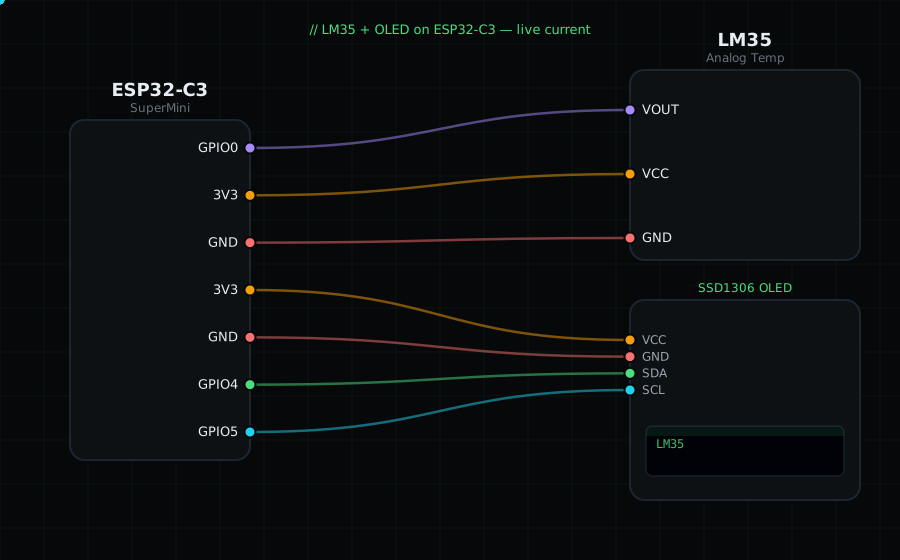
Wiring (chip flat side facing you, pins down — left to right):
LM35 +Vs (left) -> 3V3
LM35 Vout (middle) -> GPIO0
LM35 GND (right) -> GND
OLED VCC=3V3, GND=GND, SDA=GPIO4, SCL=GPIO5
Libraries: only "Adafruit SSD1306" and "Adafruit GFX Library" (no sensor library needed).
On screen / Serial: temperature in °C with one decimal, updated a few times a second.
Gotchas: The plain LM35 can't read below 0 °C without a negative supply. GPIO0 is a strapping/boot pin on the ESP32-C3 — it's fine to read at runtime, but don't hold it low while resetting. Keep the wire short to reduce noise; average a few samples if the value jitters.
Circuit Diagram
Parts You Need
Source Code (Arduino / ESP32)
#include <Wire.h>
#include <Adafruit_GFX.h>
#include <Adafruit_SSD1306.h>

Adafruit_SSD1306 display(128, 64, &Wire, -1);

#define LM35 0                // Vout on GPIO0 (ADC)

void setup() {
  Serial.begin(115200);
  Wire.begin(4, 5);
  display.begin(SSD1306_SWITCHCAPVCC, 0x3C);
}

void loop() {
  int mv = analogReadMilliVolts(LM35);       // calibrated millivolts
  float tempC = mv / 10.0;                    // LM35: 10 mV per °C

  display.clearDisplay();
  display.setTextColor(SSD1306_WHITE);
  display.setTextSize(1);
  display.setCursor(0, 0);
  display.println("LM35");
  display.setTextSize(3);
  display.setCursor(0, 24);
  display.printf("%.1f", tempC);
  display.setTextSize(2);
  display.print(" C");
  display.display();

  Serial.printf("Temp: %.1f C  (%d mV)\n", tempC, mv);
  delay(300);
}