KY-038 on OLED: Sound Level Meter
Overview & Wiring
What it is: The KY-038 (and near-identical KY-037) is a microphone module with an amplifier. Its analog output tracks sound level, so you can build a clap detector, noise meter, or sound-reactive light.
How it works: The electret mic feeds an op-amp; AO gives an audio-frequency signal riding on a mid-rail offset. To get a "loudness" number you sample AO quickly and measure the peak-to-peak swing over a short window. This sketch maps that swing to 0–100 %.
Wiring:
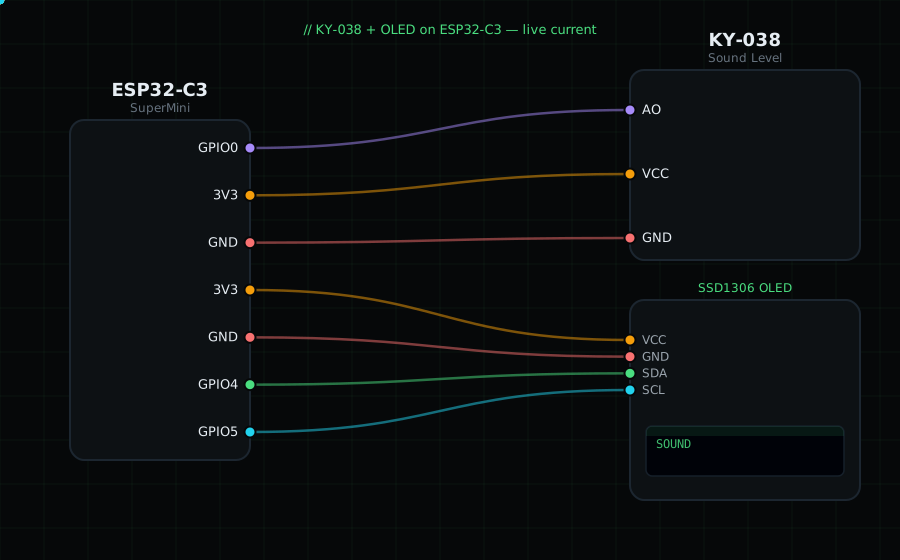
KY-038 AO -> GPIO0 (analog)
KY-038 VCC -> 3V3 (use "+" ; the module runs on 3.3–5V)
KY-038 GND -> GND
OLED VCC=3V3, GND=GND, SDA=GPIO4, SCL=GPIO5
Libraries: only "Adafruit SSD1306" and "Adafruit GFX Library".
On screen / Serial: a 0–100 sound level with a bar. Clap or talk near the mic.
Gotchas: Turn the onboard trimmer to set the amplifier gain — too high and it clips (stuck at 100), too low and it never moves. AO is an audio signal, not a steady voltage, so you must sample the peak-to-peak (as done here), not read it once.
Circuit Diagram
Parts You Need
Source Code (Arduino / ESP32)
#include <Wire.h>
#include <Adafruit_GFX.h>
#include <Adafruit_SSD1306.h>

Adafruit_SSD1306 display(128, 64, &Wire, -1);

#define MIC 0                 // AO on GPIO0 (ADC)

void setup() {
  Serial.begin(115200);
  Wire.begin(4, 5);
  display.begin(SSD1306_SWITCHCAPVCC, 0x3C);
}

void loop() {
  int hi = 0, lo = 4095;
  unsigned long start = millis();
  while (millis() - start < 40) {              // 40 ms sampling window
    int v = analogRead(MIC);
    if (v > hi) hi = v;
    if (v < lo) lo = v;
  }
  int pp = hi - lo;                            // peak-to-peak swing
  int level = map(constrain(pp, 0, 3000), 0, 3000, 0, 100);

  display.clearDisplay();
  display.setTextColor(SSD1306_WHITE);
  display.setTextSize(1);
  display.setCursor(0, 0);
  display.println("KY-038 Sound");
  display.setTextSize(3);
  display.setCursor(0, 18);
  display.printf("%d", level);
  display.drawRect(0, 54, 128, 8, SSD1306_WHITE);
  display.fillRect(0, 54, map(level, 0, 100, 0, 128), 8, SSD1306_WHITE);
  display.display();

  Serial.printf("Sound: %d  (pp %d)\n", level, pp);
}