INA219 on OLED: Current, Voltage & Power
Overview & Wiring
What it is: The INA219 is a digital power monitor. It measures bus voltage, current (through a built-in shunt) and computes power, then reports them over I2C — no analog maths or dividers needed. It's the clean way to profile how much your project draws.
How it works: I2C device at address 0x40. It reads the voltage drop across an onboard 0.1Ω shunt to get current, plus the bus voltage, and does the calibration internally. Shares SDA/SCL with the OLED.
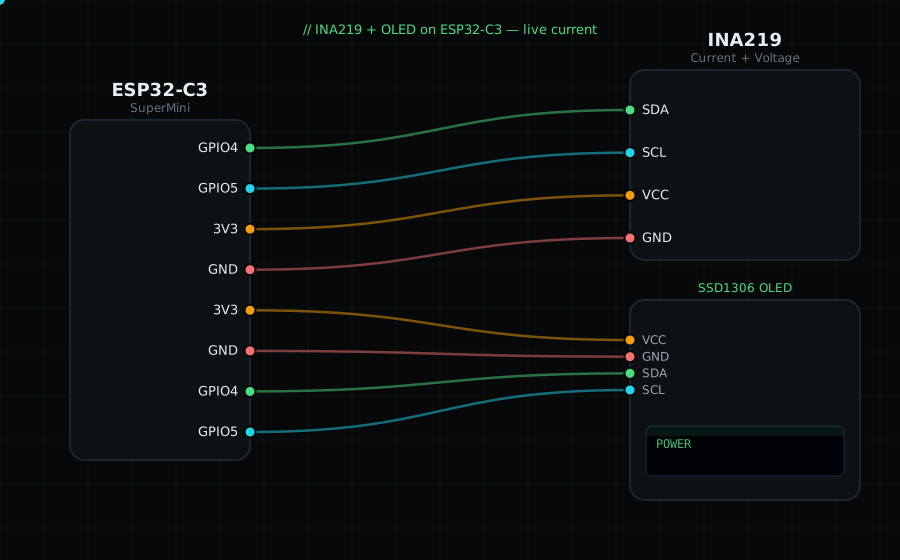
Wiring (shared I2C bus with the OLED):
INA219 SDA -> GPIO4
INA219 SCL -> GPIO5
INA219 VCC -> 3V3
INA219 GND -> GND
Vin+ and Vin- screw terminals go in series with your load (Vin+ from supply, Vin- to load).
OLED VCC=3V3, GND=GND, SDA=GPIO4, SCL=GPIO5
Libraries: "Adafruit INA219" (installs "Adafruit BusIO"), plus "Adafruit SSD1306" and "Adafruit GFX Library".
On screen / Serial: bus voltage (V), current (mA) and power (mW).
Gotchas: Default address is 0x40; solder jumpers give 0x41/0x44/0x45 for multiple units. It measures up to 26V and ±3.2A with the stock shunt. Put the shunt (Vin+/Vin-) in series with the load, not across it, or you'll short your supply.
Circuit Diagram
Parts You Need
Source Code (Arduino / ESP32)
#include <Wire.h>
#include <Adafruit_GFX.h>
#include <Adafruit_SSD1306.h>
#include <Adafruit_INA219.h>

Adafruit_SSD1306 display(128, 64, &Wire, -1);
Adafruit_INA219 ina219;

void setup() {
  Serial.begin(115200);
  Wire.begin(4, 5);
  display.begin(SSD1306_SWITCHCAPVCC, 0x3C);
  if (!ina219.begin()) {
    Serial.println("INA219 not found");
    display.setTextColor(SSD1306_WHITE);
    display.setCursor(0, 28); display.println("INA219 not found");
    display.display();
    while (1) delay(10);
  }
}

void loop() {
  float busV  = ina219.getBusVoltage_V();
  float curmA = ina219.getCurrent_mA();
  float powmW = ina219.getPower_mW();

  display.clearDisplay();
  display.setTextColor(SSD1306_WHITE);
  display.setTextSize(1);
  display.setCursor(0, 0);  display.println("INA219 Power");
  display.setCursor(0, 18); display.printf("V: %.2f V", busV);
  display.setCursor(0, 34); display.printf("I: %.1f mA", curmA);
  display.setCursor(0, 50); display.printf("P: %.1f mW", powmW);
  display.display();

  Serial.printf("%.2f V  %.1f mA  %.1f mW\n", busV, curmA, powmW);
  delay(800);
}