DHT11 on OLED: Temperature & Humidity
Overview & Wiring
What it is: The DHT11 is a low-cost digital temperature and humidity sensor. It measures 0–50 °C (±2 °C) and 20–90 % RH (±5 %) and sends both values as a digital signal over a single data wire.
How it works: An onboard chip samples a thermistor and a humidity element, then clocks the result out on the DATA pin using a timed one-wire protocol. The DHT library handles that timing for you.
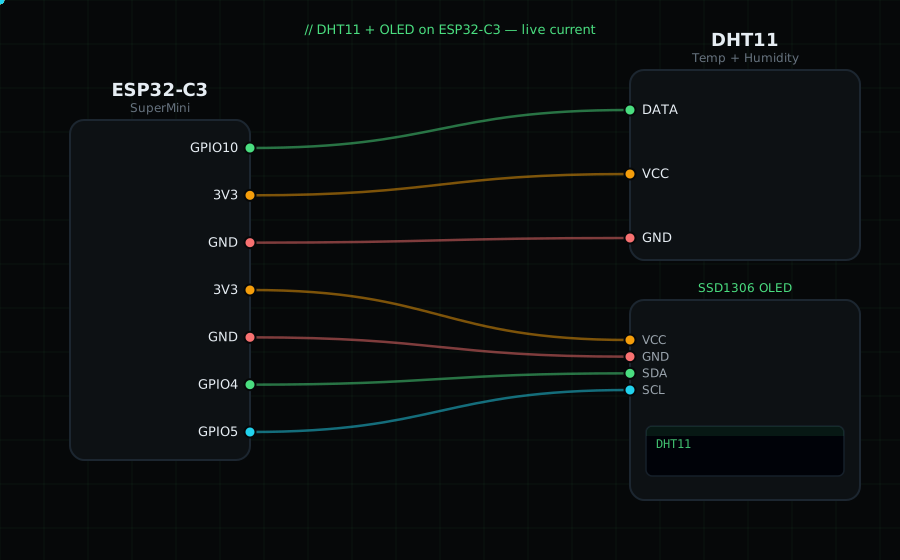
Wiring:
DHT11 DATA -> GPIO10
DHT11 VCC -> 3V3
DHT11 GND -> GND
OLED VCC=3V3, GND=GND, SDA=GPIO4, SCL=GPIO5
If you use a bare 3-pin DHT11 (no module PCB), add a 10k pull-up resistor between DATA and 3V3.
Libraries (Arduino IDE -> Library Manager): "DHT sensor library" by Adafruit (it will also install "Adafruit Unified Sensor"), plus "Adafruit SSD1306" and "Adafruit GFX Library".
On screen / Serial: big temperature in °C and humidity in % on the OLED, same values printed to Serial. Updates every 2 seconds (the DHT11 can only be read about once per second).
Gotchas: The DHT11 is slow and coarse — if you need decimals or faster updates, use the DHT22. A reading of "nan" means a wiring or timing fault; check the DATA pin and pull-up.
Circuit Diagram
Parts You Need
Source Code (Arduino / ESP32)
#include <Wire.h>              // I2C for the OLED
#include <Adafruit_GFX.h>     // graphics primitives
#include <Adafruit_SSD1306.h> // OLED driver
#include <DHT.h>              // DHT temperature/humidity library

Adafruit_SSD1306 display(128, 64, &Wire, -1); // 128x64 OLED over I2C

#define DHTPIN 10             // DATA wire on GPIO10
#define DHTTYPE DHT11         // this is a DHT11 (not DHT22)
DHT dht(DHTPIN, DHTTYPE);

void setup() {
  Serial.begin(115200);
  Wire.begin(4, 5);                          // OLED I2C: SDA=GPIO4, SCL=GPIO5
  display.begin(SSD1306_SWITCHCAPVCC, 0x3C); // OLED at address 0x3C
  dht.begin();
}

void loop() {
  float t = dht.readTemperature();           // °C
  float h = dht.readHumidity();              // %

  display.clearDisplay();
  display.setTextColor(SSD1306_WHITE);
  display.setTextSize(1);
  display.setCursor(0, 0);
  display.println("DHT11");

  if (isnan(t) || isnan(h)) {                // read failed
    display.setCursor(0, 26);
    display.println("Read failed");
    Serial.println("DHT11 read failed");
  } else {
    display.setTextSize(2);
    display.setCursor(0, 18); display.printf("%.0f C", t);
    display.setCursor(0, 42); display.printf("%.0f %%", h);
    Serial.printf("Temp: %.0f C  Humidity: %.0f %%\n", t, h);
  }
  display.display();
  delay(2000);
}