BMP280 on OLED: Pressure & Temperature
Overview & Wiring
What it is: The BMP280 is a Bosch barometric pressure + temperature sensor. It reads 300–1100 hPa and is accurate enough to detect altitude changes of about a metre.
How it works: It's an I2C device, so it shares the same two wires (SDA/SCL) as the OLED — just different addresses. The library reads the calibrated pressure and temperature registers for you.
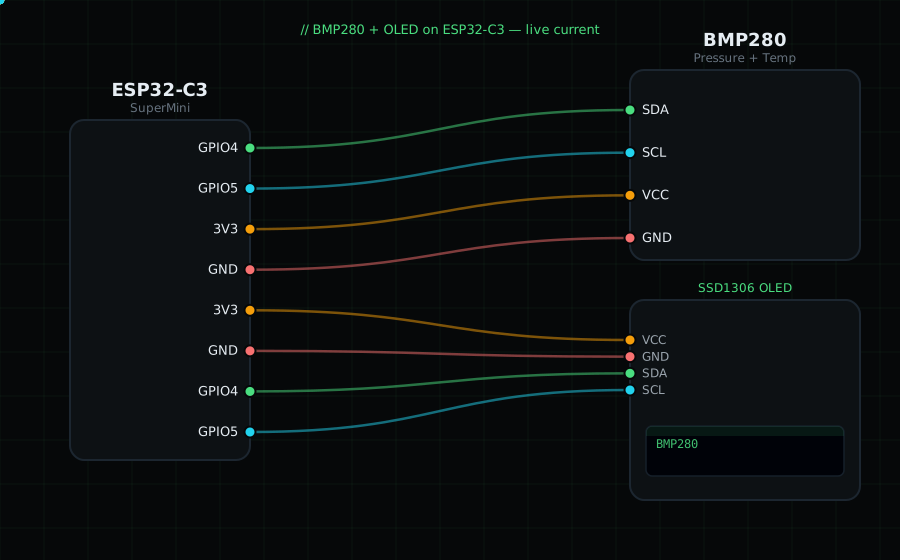
Wiring (shared I2C bus with the OLED):
BMP280 SDA -> GPIO4 (same pin as OLED SDA)
BMP280 SCL -> GPIO5 (same pin as OLED SCL)
BMP280 VCC -> 3V3
BMP280 GND -> GND
OLED VCC=3V3, GND=GND, SDA=GPIO4, SCL=GPIO5
Libraries: "Adafruit BMP280 Library" (installs "Adafruit BusIO"), plus "Adafruit SSD1306" and "Adafruit GFX Library".
On screen / Serial: pressure in hPa and temperature in °C. Blow gently on it to see the temperature move.
Gotchas: Most breakout boards use I2C address 0x76; a few use 0x77 — the code tries 0x76 first, then 0x77. If begin() fails, run an I2C scanner to confirm the address. Pressure in hPa = the library's Pa reading divided by 100.
Circuit Diagram
Parts You Need
Source Code (Arduino / ESP32)
#include <Wire.h>
#include <Adafruit_GFX.h>
#include <Adafruit_SSD1306.h>
#include <Adafruit_BMP280.h>

Adafruit_SSD1306 display(128, 64, &Wire, -1);
Adafruit_BMP280 bmp(&Wire);

void setup() {
  Serial.begin(115200);
  Wire.begin(4, 5);                          // shared I2C bus
  display.begin(SSD1306_SWITCHCAPVCC, 0x3C);
  if (!bmp.begin(0x76) && !bmp.begin(0x77)) {// try both common addresses
    Serial.println("BMP280 not found");
    display.setTextColor(SSD1306_WHITE);
    display.setCursor(0, 28); display.println("BMP280 not found");
    display.display();
    while (1) delay(10);
  }
}

void loop() {
  float t  = bmp.readTemperature();          // °C
  float hpa = bmp.readPressure() / 100.0;    // Pa -> hPa

  display.clearDisplay();
  display.setTextColor(SSD1306_WHITE);
  display.setTextSize(1);
  display.setCursor(0, 0);
  display.println("BMP280");
  display.setTextSize(2);
  display.setCursor(0, 16); display.printf("%.1f C", t);
  display.setCursor(0, 42); display.printf("%.0f hPa", hpa);
  display.display();

  Serial.printf("Temp: %.1f C  Pressure: %.1f hPa\n", t, hpa);
  delay(1000);
}