BH1750 on OLED: Light Level in Lux
Overview & Wiring
What it is: The BH1750 is a digital ambient-light sensor that reports real lux (1–65535), unlike an LDR which only gives a relative reading. Great for auto-brightness and light-logging projects.
How it works: I2C device (address 0x23, or 0x5C if ADDR is tied high). Its response is close to the human eye's, so the lux figure is meaningful. Shares SDA/SCL with the OLED.
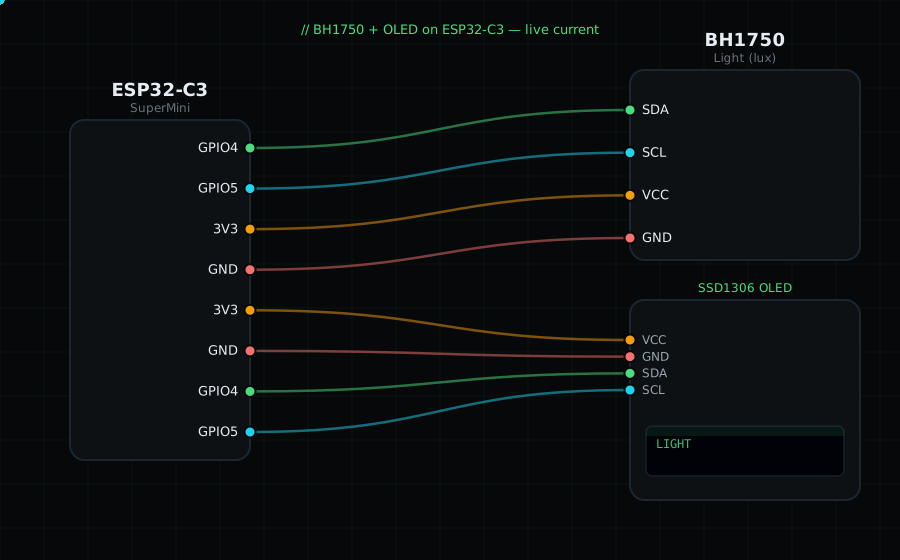
Wiring (shared I2C bus with the OLED):
BH1750 SDA -> GPIO4
BH1750 SCL -> GPIO5
BH1750 VCC -> 3V3
BH1750 GND -> GND
BH1750 ADDR -> leave open (address 0x23)
OLED VCC=3V3, GND=GND, SDA=GPIO4, SCL=GPIO5
Libraries: "BH1750" by Christopher Laws, plus "Adafruit SSD1306" and "Adafruit GFX Library".
On screen / Serial: light level in lux. Cover it with your hand vs point it at a lamp to see the range (a dim room ≈ 50 lx, direct sun ≈ 30000+ lx).
Gotchas: If begin() fails, try address 0x5C. The sensor saturates in direct sunlight; use continuous high-res mode (the default here) for indoor work.
Circuit Diagram
Parts You Need
Source Code (Arduino / ESP32)
#include <Wire.h>
#include <Adafruit_GFX.h>
#include <Adafruit_SSD1306.h>
#include <BH1750.h>

Adafruit_SSD1306 display(128, 64, &Wire, -1);
BH1750 lightMeter;

void setup() {
  Serial.begin(115200);
  Wire.begin(4, 5);
  display.begin(SSD1306_SWITCHCAPVCC, 0x3C);
  if (!lightMeter.begin(BH1750::CONTINUOUS_HIGH_RES_MODE, 0x23)) {
    Serial.println("BH1750 not found");
    display.setTextColor(SSD1306_WHITE);
    display.setCursor(0, 28); display.println("BH1750 not found");
    display.display();
    while (1) delay(10);
  }
}

void loop() {
  float lux = lightMeter.readLightLevel();

  display.clearDisplay();
  display.setTextColor(SSD1306_WHITE);
  display.setTextSize(1);
  display.setCursor(0, 0);
  display.println("BH1750 Light");
  display.setTextSize(3);
  display.setCursor(0, 22);
  display.printf("%.0f", lux);
  display.setTextSize(1);
  display.setCursor(0, 54); display.print("lux");
  display.display();

  Serial.printf("Light: %.1f lux\n", lux);
  delay(500);
}