A3144 Hall Sensor on OLED: Magnet Detection
Overview & Wiring
What it is: The A3144 is a digital Hall-effect sensor that switches when a magnet is near. It's used for RPM/speed counting, door-open detection, and end-stops — anywhere you want contactless "is a magnet here?" sensing.
How it works: Its output is open-collector and active-LOW: it pulls OUT to GND when the south pole of a magnet faces it, and floats otherwise. You enable the ESP32's internal pull-up so "no magnet" reads HIGH. Digital only.
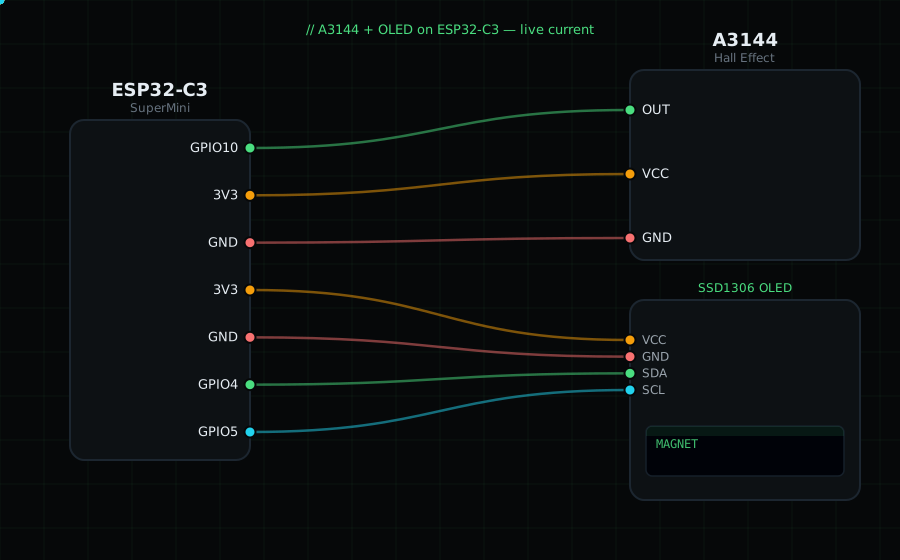
Wiring (flat face toward you, pins down — left to right):
A3144 VCC (left) -> 3V3
A3144 GND (middle)-> GND
A3144 OUT (right) -> GPIO10
OLED VCC=3V3, GND=GND, SDA=GPIO4, SCL=GPIO5
Libraries: only "Adafruit SSD1306" and "Adafruit GFX Library".
On screen / Serial: "MAGNET" when a magnet is close, "none" otherwise. Bring a fridge magnet toward it.
Gotchas: It responds to only one magnetic polarity (south face) — flip the magnet if nothing happens. Because it's open-collector you MUST use a pull-up (the code enables the internal one). For counting wheel revolutions, glue a small magnet to the wheel.
Circuit Diagram
Parts You Need
Source Code (Arduino / ESP32)
#include <Wire.h>
#include <Adafruit_GFX.h>
#include <Adafruit_SSD1306.h>

Adafruit_SSD1306 display(128, 64, &Wire, -1);

#define HALL 10               // OUT on GPIO10 (open-collector, active-LOW)

void setup() {
  Serial.begin(115200);
  Wire.begin(4, 5);
  display.begin(SSD1306_SWITCHCAPVCC, 0x3C);
  pinMode(HALL, INPUT_PULLUP);                 // pull-up so idle = HIGH
}

void loop() {
  bool magnet = digitalRead(HALL) == LOW;      // LOW = magnet present

  display.clearDisplay();
  display.setTextColor(SSD1306_WHITE);
  display.setTextSize(1);
  display.setCursor(0, 0);
  display.println("A3144 Hall");
  display.setTextSize(2);
  display.setCursor(0, 26);
  display.println(magnet ? "MAGNET" : "none");
  display.display();

  Serial.println(magnet ? "MAGNET" : "none");
  delay(120);
}